Introducing BillRoute Pay
Approve the invoice and pay the vendor, ACH, digital, or physical check, without leaving BillRoute.
Process invoices without the manual grind.
BillRoute automates invoice intake and review, resulting in cleaner numbers and a shorter month-end close.
Trusted by teams managing 24,000+ units


















See it in action
Watch BillRoute in 60 seconds.
From inbox to ERP, automated.
The problem
Manual invoice processing doesn't scale.
As your portfolio grows, invoice volume grows with it, but the manual process doesn't get easier.
Time drain
Hours spent re-keying invoices, chasing approvals, and manually coding GL entries every single month.
Coding errors
Manual GL coding leads to duplicate payments, misallocated expenses, and a messy month-end close.
Zero visibility
No single view of what's been processed, what's pending approval, and what's posted to the ERP.
How it works
From inbox to ERP. Automatically.
Invoices captured
Invoices arrive from email, uploads, or vendor portals and are ingested automatically. No re-keying, no lost documents.
AI-coded & validated
Invoice data is extracted, validated against PO data, and coded to the correct GL account based on your rules.
Posted & tracked
Approved invoices sync to your ERP with a complete audit trail. Real-time status on every invoice, every entity.
Invoice capture
Every invoice, in one place, automatically.
Invoices ingested from email, uploads, and vendor portals. No manual entry
Reads handwritten invoices, including field vendor invoices most tools can't process
Duplicate detection flags re-submitted invoices before they hit approval
Exception queue surfaces only what needs human attention
Document intelligence
Every document handled. Even the tricky ones.
Multi-invoice PDFs detected and pages grouped by invoice. A person approves the split before it posts
Handwritten invoices from field vendors processed alongside digital ones
Non-invoice documents like W-9s and insurance certificates filtered out automatically
Every document tracked through extraction with a full audit trail
Handwritten invoices
Seven scrawled amounts in. Three coded lines out.
A field vendor writes the invoice on a carbonless pad, photographs it crooked, and emails it. The form carries no letterhead, so the vendor stamped itself into the Ship To box, and the printed Date field is empty.
BillRoute posted invoice 104240 as three GL-coded lines. It grouped seven handwritten amounts onto the three account codes the approver stamped across the middle of the page, and reconciled to $1,060.00.
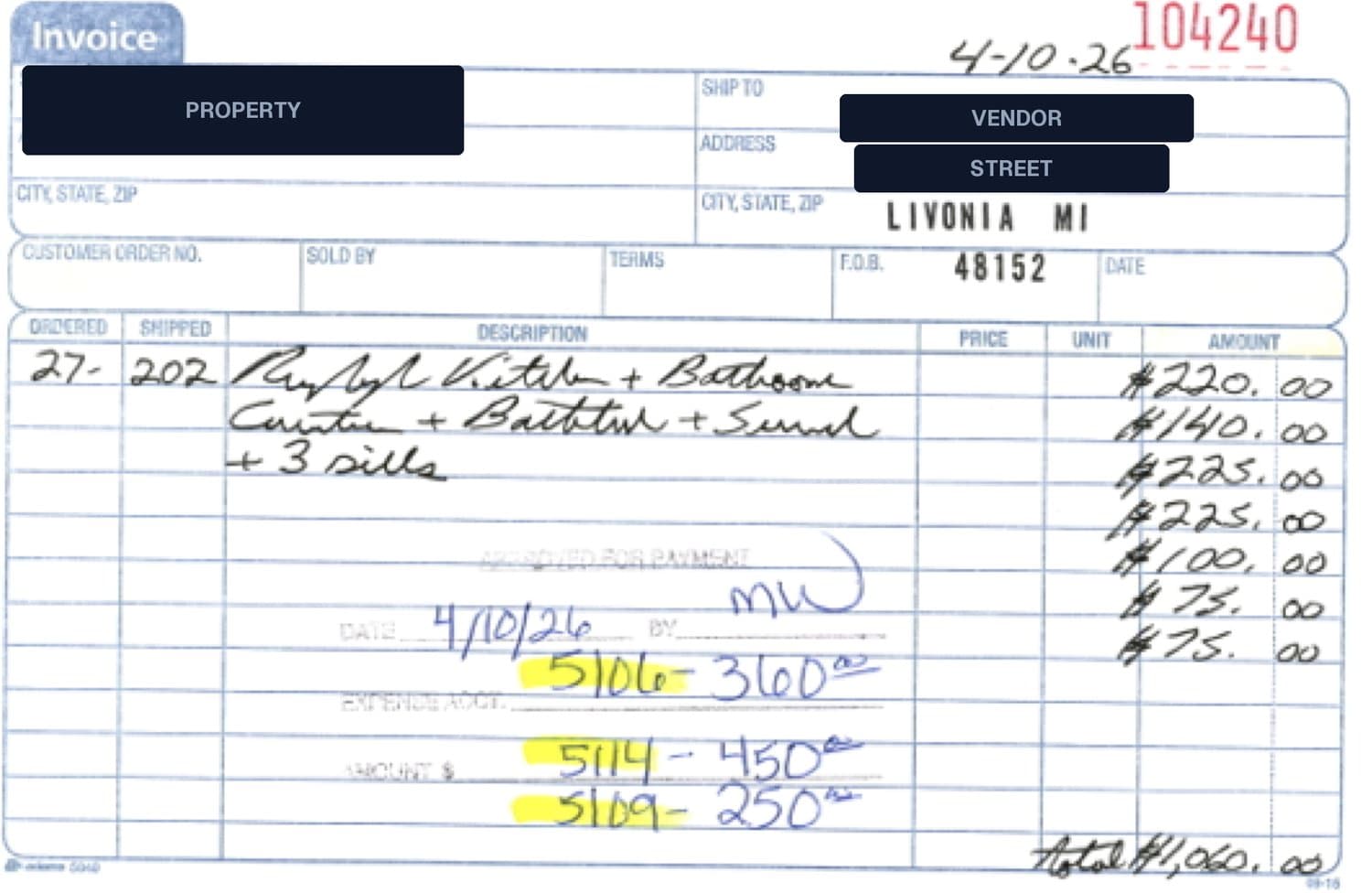
Adams 5840 carbonless form. Vendor and property redacted. Reported processing time on this page was 0.10 minutes.
Executive dashboard
Real-time visibility into your AP operation.
Invoices handled, upload success rate, and error queue tracked in real time
Dollar value of invoices processed and late fees avoided, updated each month
Speed to submission and FTE efficiency gains calculated automatically
Compare current month vs. last month to track improvement over time
Capture, coding & posting
A PDF hits the inbox. Minutes later it's in ResMan.
No re-keying, no lookup tables, no copy-paste into the PMS. BillRoute reads the document against a template it learned from this supplier, codes every line to the right property, unit and GL account, and posts it, with the ResMan invoice number written back.
Handwritten field invoices included. Every field carries a confidence score and a full audit trail, and anything the model isn't sure about lands in the exception queue instead of the ledger.
Automated workflows
Approvals route themselves. Every time.
Build the chain once. Who signs, in what order, on which invoices. BillRoute matches every incoming invoice against your rules and walks it through to posting without anyone chasing anyone.
One workflow, three signatures, zero follow-up emails. The engine picked the Capex chain over two lower-priority workflows because a line hit a capex GL code, and escalates on its own if a step goes quiet for 48 hours.
Value calculator
What could you save?
Use our quick calculator to estimate time and money saved by automating your invoice process.
ResProp Management eliminates $150K+ in annual AP costs with BillRoute.
ROI calculator
See what BillRoute could save your organization
Return is annual savings divided by the BillRoute cost at this volume, $31,188 a year at $99 a month plus $1 per invoice. Savings are modeled from your inputs.
Customer stories
Trusted by AP teams who've been there
“BillRoute has elevated our AP process. Internal processing takes far less effort, and invoice approvals move noticeably faster. I'd recommend it to any team looking to improve how their AP workflows run.”
“BillRoute has significantly reduced the administrative burden on our teams while improving invoice visibility and internal controls. It's removed a lot of day-to-day friction and made the process far easier to manage.”
Built for your role
Everyone on the team wins
BillRoute is built around the real workflows of every person who touches an invoice.
AP teams
Stop re-keying. Start reviewing.
Upload a PDF and BillRoute extracts every field automatically
One queue for exceptions. No hunting across email and shared drives
Approval workflows that actually match how your team operates
Know exactly where every invoice stands at any moment
Controllers
Clean close. Every month.
Invoices post to your GL with the right coding. No corrections needed
Month-end close runs days faster when approvals don't bottleneck
Full audit trail on every transaction for compliance and reviews
CFOs
Know where every dollar is going.
Executive dashboard with AP visibility across every entity and property
Catch duplicate invoices and policy violations before they post
Reduce AP labor costs while processing higher invoice volume
Board-ready reporting without waiting on your Controller
Integrations
Works inside the tools your team already uses
BillRoute is built native-first for ResMan. It also supports Coupa and standard ERP data formats, and the platform is built to be integration-flexible for additional systems as needed.
Native ResMan integration, chart of accounts, vendors, and properties sync automatically
Coupa support for teams with procurement workflows that run through Coupa
Standard ERP data formats supported, integration-flexible by design
Additional systems supported as needed, ask us about your stack
Built on ResMan. Vendors, properties, chart of accounts, and GL codes sync in real time.
Coupa-connected teams can route BillRoute invoices through existing procurement workflows.
BillRoute supports standard ERP data formats and is built to connect to additional systems as your stack evolves. Ask us about your setup.
How we compare
Two of these five connect to ResMan. One was built on it.
Five vendors on the five questions a property management AP team asks first: who reads the paper, who signs, how the vendor gets paid, whether it talks to ResMan, and what it costs.
| Capability | BillRoute Built on ResMan | AvidXchange AvidInvoice, AvidPay | BILL bill.com | MRI Software MRI Vendor Pay | Yardi Smart AP, Breeze Premier |
|---|---|---|---|---|---|
| Invoice capture | AI extraction from email, uploads, and vendor portals. Reads handwritten invoices; invoice 104240 above is one. Multi-invoice PDFs are grouped by page, and a person confirms the split. | Email or scan. AI plus what their site calls expert indexers. Their site says it captures "every invoice, including handwritten ones." | BILL AI reads vendor, invoice number, amount, due date, and line items, per their site. Handwritten: not stated. | Through MRI Vendor Pay, "powered by AvidXchange" in MRI's words. Handwritten: not stated. | Smart AP reads the invoice and creates the record with no manual entry, per Yardi. Handwritten: not stated. |
| Approval workflow | Role-based chains: Property Manager, Regional Manager, Capex Director. A quiet step escalates after 48 hours. Trusted vendors bypass the chain on non-PO invoices. | "Customizable approval workflows," their phrase. Approvals enforced inside the ResMan integration, per their integration page. | "As many controlled rules, roles, steps, and approval processes as you need," their words. Approvals on mobile. | Delivered inside MRI Vendor Pay. | Three tiers in Breeze Premier. Two sign off on the invoice, the third releases payment, per Yardi. |
| Payment methods | ACH, digital check, and physical check through BillRoute Pay. No virtual card. | Virtual card, ACH, or check, per their ResMan integration page. | ACH $0.59 and check $1.99 per payment. Same- or next-day ACH $11.99. Card 2.9%. All published on their pricing page. | Check, ACH, or virtual card, per MRI's Vendor Pay page. | Check, EFT, and Yardi Bill Pay, per Yardi. |
| ResMan integration | Native. Built on ResMan. Vendors, properties, chart of accounts, and GL codes sync from it. | Full API integration, announced May 17, 2022. Accounting code matching, supplier sync, and invoice batching, in their release's words. | None. ResMan is not on their integrations page. | None listed on ResMan's partner page. MRI is itself a property management system. | None listed on ResMan's partner page. Yardi is itself a property management system. |
| Pricing | Not published. We quote it. | Not published on their site. | Published. $49, $65, or $89 per user per month, plus the per-payment fees above. | Not published on the Vendor Pay page. | Smart AP is free inside Breeze Premier, per Yardi's June 8, 2026 post. |
Competitor cells state what each vendor's own public page said when we checked it on September 16, 2026. "Not stated" means the vendor's page for that product does not address the row. Sources: AvidXchange, avidxchange.com ResMan integration, AvidInvoice, invoice automation and AvidPay pages, and its May 17, 2022 GlobeNewswire release. BILL, bill.com pricing, accounts payable, integrations and learning pages. MRI Software, mrisoftware.com Vendor Pay page. Yardi, yardibreeze.com Smart AP post of June 8, 2026. ResMan partner page, myresman.com.
FAQ
Common questions
What does BillRoute do?
How does BillRoute use AI?
Does BillRoute replace our ERP?
Which systems does BillRoute integrate with?
Who is BillRoute built for?
How much invoice volume can BillRoute handle?
What problems does BillRoute solve?
How does BillRoute improve financial accuracy?
Is BillRoute suitable for multi-entity or portfolio operations?
How long does implementation take?
Rex Tech Platform
Now spanning invoice to payout
BillRoute processes the invoices, and with BillRoute Pay, it now pays the vendors too. Approval and payment live in one platform, on one vendor record. IDCore adds vendor compliance next.
Explore BillRoute PayComing to BillRoute Pay
Approve today. Paid today.
We are adding real-time payments to BillRoute Pay.
Today an approved invoice waits for the daily payment run and then for the rail, and somewhere in that stretch the vendor calls AP to ask where the money is. The payout we are working on leaves when the approval lands and posts to the same invoice record the vendor already checks in their portal.
There is no ship date and no fee on this page because neither is settled. When they are, this section will carry the screen and the numbers.
Top row: BillRoute Pay today. Bottom row: the version in the works. No screen to show yet, so a diagram.
Moved between US banks over the RTP network in the second quarter of 2026 alone.
The Clearing House, theclearinghouse.org, August 2026
The rails exist and the banks are on them. The Clearing House reports 1,357+ financial institutions live on its RTP network as of August 2026. FedNow, the Federal Reserve's network, launched in July 2023 and settled $853.4 billion in 2025, by the Fed's own count.
Demand is on record too. In the Federal Reserve's Business Payments Study, 28% of businesses named payments that are too slow as their top operational payment challenge, and 48% of those adopting faster payments said cost reduction was the reason.
Those figures describe US banking, and they are why real-time payments are the next thing we are building into BillRoute Pay. What BillRoute Pay ships today is ACH, digital check, and physical check.
Ready to automate
your invoices?
See BillRoute in action. Get a personalized demo for your organization.